


Among all WordPress page building tools, Elementor is undoubtedly one of the most popular plugins. Whether you are a novice website builder or a professional developer, Elementor can help you quickly create high-quality website pages.
If you are building an independent website, e-commerce website, or blog, then understanding Elementor is essential. This article will guide you through a thorough understanding of Elementor from multiple perspectives, including its features, advantages, usage methods, and pros and cons.
I. What is an Elementor?
Elementor is a Drag & Drop Page Builder PluginDesigned specifically for WordPress users.
Simply put, it can allow you to:
👉 No coding required
👉 Simply drag and drop with your mouse
👉 Real-time visual editing page
Compared to the traditional WordPress editor (Gutenberg), Elementor is more flexible and intuitive.
II. Core Functions of Elementor
1. Visual drag-and-drop editing
The most distinctive feature of Elementor is:
👉 What You See Is What You Get
The content you edit in the backend is what the user sees on the frontend.
You can drag and drop directly:
- picture
- title
- Button
- video
- Product Module
There is absolutely no need to refresh the page.
2. Abundant Widgets
Elementor has a large number of built-in components, such as:
- Title
- Image
- Button
- Slider
- Countdown
- Form
If you are using Elementor Pro, you can also use:
- Form collection (Leads)
- Login/Registration Module
- WooCommerce Product Module
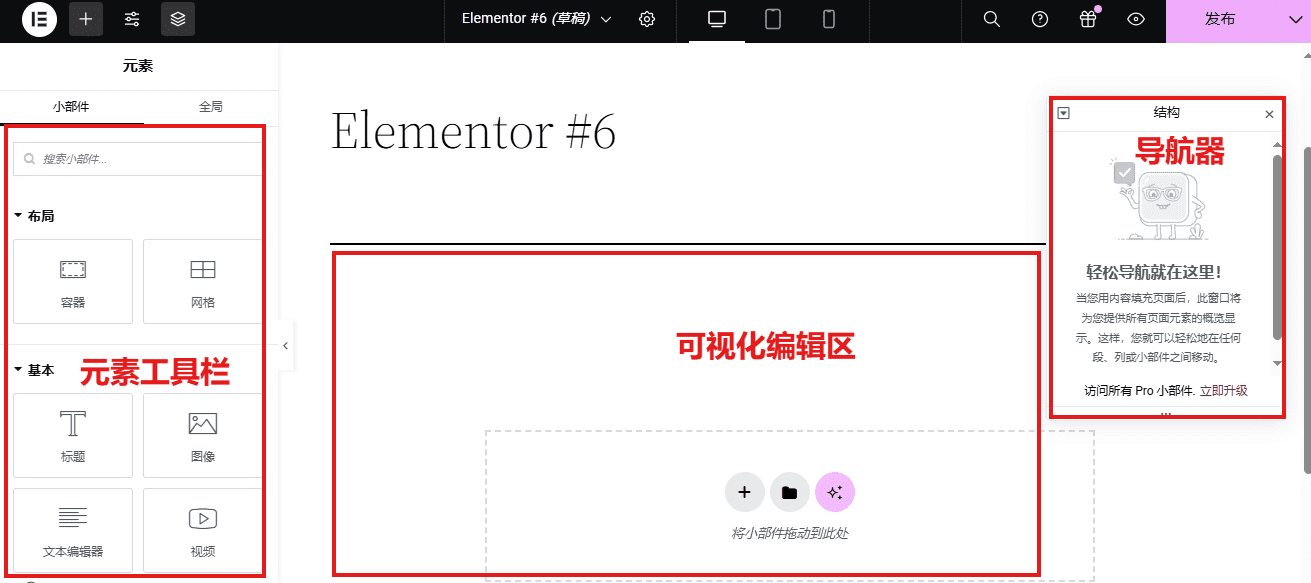
3. Templates
Elementor offers a large number of ready-made templates:
👉 Homepage Template
👉 Landing Page Template
👉 E-commerce page
👉 About Page
you can:
👉 One-click import
👉 Directly edit text and images
4. Responsive design (mobile adaptation)
Elementor supports:
👉 Independent design for PC / Tablet / Mobile
You can control it independently:
- Font size
- spacing
- Layout Structure
5. Deep integration with WooCommerce
If you're in e-commerce (and you're doing it now 👇), Elementor is a great fit:
👉 Customize product pages
👉 Custom Category Page
👉 Design high-conversion landing pages
Compared to the default WooCommerce page:
👉 Elementor looks better
👉 Higher conversion rate
6. Theme Builder
One of the biggest core features of Elementor Pro:
👉 You can customize the entire website structure.
include:
- Header
- Footer
- Single article page
- Product Page
- Category Page
III. Advantages of Elementor
✅ 1. Perfect for beginners
No coding background is required; it's usable by almost anyone.
✅ 2. Extremely high degree of design freedom
It's more flexible than traditional themes and can be laid out in any way.
✅ 3. Robust plugin ecosystem
Supports a large number of extension plugins, such as:
- Essential Addons
- Crocoblock
- Ultimate Addons
✅ 4. Improve conversion rate
Especially suitable for:
👉 Independent Website
👉 Landing Page
👉 Ad Page
✅ 5. SEO Friendly
For even better results, use with the following plugins:
- Rank Math
- Yoast SEO